
CompuSport
CompuSportSports
3.3189.00 Reviews
- Version
- 2.6.1.0
- Installs
- 100.00K
- Age Rating
- Everyone
Screenshots

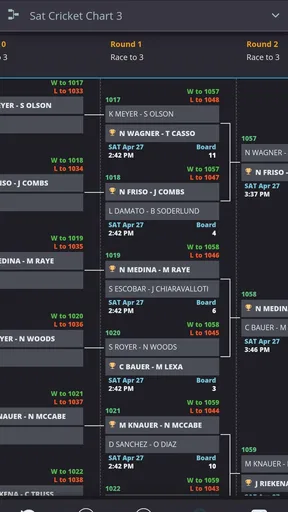
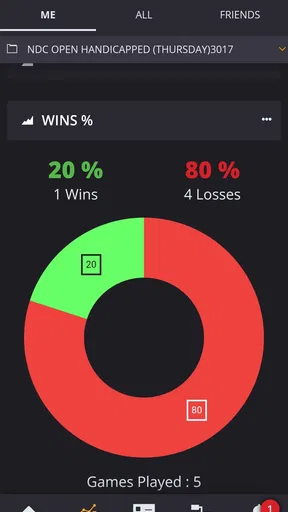
Our Review of CompuSport
 Analysis by Appyee
If you’re a sports enthusiast like me, you’ve probably been on the hunt for a great app to keep track of your games and stats. Well, let me introduce you to CompuSport. This app is a game-changer for anyone involved in sports leagues or tournaments. Now, I’ve had the chance to dig deep into this app, and I’m ready to spill the beans on everything you need to know.
Who will get the most from it?
I’d look at CompuSport first if I were joining a league or tournament that already uses it. A shared event system is most useful when the organizer, players, and spectators are all looking at the same schedules and results. The app is less compelling as a personal sports diary: its appeal is tied to organized competition, not simply recording a workout or keeping private notes about practice.
That distinction matters if you are choosing between this and a general sports tracker. A fitness app is usually the better fit for routes, training sessions, or health metrics. A spreadsheet can be easier for a small group that only needs a basic score sheet. CompuSport makes more sense when the competition itself has fixtures, standings, or tournament information that participants need to follow together.
The app is free to install, with in-app purchases listed from $0.99 to $29.99 per item. I’d start with the free experience and only consider a purchase if the app clearly presents something you need. The presence of optional purchases does not mean every player has to pay to follow an event, so check what is available in the specific league you’re joining before budgeting around it.
Getting Started with CompuSport
First things first, downloading and setting up CompuSport is a breeze. Available on both Android and iOS, you can find it in your app store and get it running in a jiffy. Once you’ve got it installed, you’ll be greeted by a smooth and intuitive interface. It’s designed to make the navigation as simple as pie, which is a big win for those of us who aren’t tech wizards.
CompuSport is a sports app from CompuSport, with a 3.2 average across around 500 ratings and more than 100,000 installs. It is free, rated for Everyone, and its current version is 2.5.9.0, with Android support beginning at version 7.0. It first appeared on February 3, 2015, so it has been around long enough to be familiar to people who regularly follow leagues and tournaments. Those figures are useful context, but the practical question is whether your own event uses it; that is what determines how much you can do with it.
After signing up, you can dive right into the world of sports. The app supports a variety of sports, from bowling to billiards, and even darts. So, whether you’re a pool shark or a bowling aficionado, CompuSport has got you covered.
Making your first visit useful
For a first-time user, I would begin with the exact league or tournament name rather than browsing broadly. Once you find the event you were invited to follow, check that the division, date, and participant details match what you expect. This small check helps avoid following a similarly named competition and gives you a useful starting point: a schedule or result that you can verify with the organizer.
A realistic first success might be checking a match time before leaving home, then returning after play to see whether the posted result reflects what happened. If you are a competitor, confirm the event with your captain or organizer before relying on a notification as your only reminder. If you are watching someone else, save the event details in a way that works for you as a backup; that is sensible for any competition app, especially when plans change quickly.
Before your first match, it is worth asking the organizer how results are entered and when they normally appear. Those details depend on how the event is run, and knowing the local routine prevents a common misunderstanding: a score that is not visible yet does not necessarily mean the event has lost it. Treat the app as a shared view of competition information, while the organizer remains the person to ask when a score or schedule needs correction.
Features Galore
Now, let’s get into the nitty-gritty of what this app has to offer. One of the standout features is the ability to track your league and tournament stats in real-time. This means you can keep an eye on your progress, compare scores, and even check out your competitors. It’s like having a personal sports analyst in your pocket!
Another great feature is notifications for upcoming matches. You’ll never miss a game again, thanks to timely alerts that keep you in the loop. Plus, the app allows for easy communication with other players, so organizing practice sessions or casual games is a walk in the park.
I would use those tools in a simple routine rather than checking constantly: look at the fixture before the week begins, revisit it if the organizer changes plans, then check the result after play. That gives the schedule and notifications a clear job without letting phone alerts take over. If the event information looks stale or conflicts with a message from the organizer, confirm which one is current before setting off.
The app’s useful role is not limited to the person playing. A family member following a tournament can use event information to decide when to arrive, while a captain can point teammates to a common reference instead of repeating every update in separate chats. That shared reference can reduce confusion, but it works best when everyone checks the same event and understands that official corrections still come from the people running it.
For those who love to dive deep into data, the app offers detailed statistics and history tracking. This lets you analyze your performance over time and see where you need to improve. It’s like having a coach right there with you, minus the whistle.
Reading results without overreading them
Competition statistics are most helpful when you compare like with like. I would look at results within the same league, format, or period before drawing conclusions about improvement. A strong showing in one match is encouraging, but it is not a complete picture of a player’s ability; schedules, opponents, and event formats all shape the numbers. Used thoughtfully, history can prompt a useful question for practice rather than serve as a verdict on how good you are.
This is also where the app differs from a plain messaging group. A chat is handy for quick questions, but schedules and results can disappear under later messages or become hard to search. A tournament-focused app can give participants a more structured place to check competition information. The trade-off is that a chat may still be quicker for last-minute changes, so I would keep the organizer’s preferred communication channel available rather than assuming one tool replaces the other.
User Experience
The user experience with CompuSport is top-notch. The developers have clearly put a lot of thought into making the app user-friendly. Navigating through different sections is seamless, and the design is clean and modern. I especially appreciated the color coding for different sports and events, which makes everything easy on the eyes.
One thing I noticed is how responsive the app is. Whether you’re loading up scores, checking schedules, or messaging teammates, everything runs smoothly without a hitch. It’s refreshing to use an app that doesn’t keep you waiting with loading spinners.
Even with a straightforward layout, first-time users can still get tripped up by the difference between finding an event and being fully involved in it. Seeing a competition does not automatically answer who is responsible for entering results, whether a schedule has changed, or which contact handles a dispute. I would treat the app as the place to consult, then use the organizer for decisions that affect eligibility, match arrangements, or a score correction.
Another practical point is device support. Android users need version 7.0 or later, while iOS users can find the app through their app store. If you share a device with a younger player, the Everyone age rating makes the basic audience clear, but adults should still help with account setup and event choices when appropriate. The most useful setup is the one that gets the right competition in front of the right person, not one filled with alerts for events they do not follow.
Community and Social Features
One of the coolest aspects of CompuSport is its community feature. You can connect with fellow players, join groups, and share tips or strategies. It’s a great way to build a network of sports enthusiasts who share your passion.
Moreover, the social features are quite robust. You can share your achievements on social media, bringing a competitive edge to your games. Who doesn’t love a little friendly rivalry, right?
When another approach is better
I would skip this app if your sport is informal, your group does not use CompuSport, or all you need is a private log of practice. In those situations, a simple shared calendar, a group chat, or a notes app may involve less setup and give you exactly what you need. Likewise, someone who wants detailed training plans or wearable-based fitness tracking should choose a tool built for those jobs rather than expecting a league app to act as a personal coach.
For an organizer, the decision is less about whether the app looks convenient and more about whether participants will actually use it. Before asking a whole group to switch, agree on one source for official schedules and results, explain who posts corrections, and decide which channel handles urgent changes. That small bit of coordination is a worthwhile trade-off: without it, players can end up checking different places and still miss the latest instruction.
The public response is mixed, with 181 written reviews alongside the broader rating picture. I would not treat an average score as a guarantee that the app will fit every event or phone. If you are unsure, install it before competition day, locate the relevant event, and make sure the information you need is easy to find. A short trial is more reassuring than discovering a setup issue while you are already on the way to a match.
Final Thoughts
In conclusion, CompuSport is a must-have app for anyone serious about their sports leagues and tournaments. It combines ease of use with powerful features, making it a standout choice for both casual players and dedicated athletes. Whether you’re looking to track your scores, improve your skills, or simply connect with other sports lovers, this app has got you covered.
So, if you’re ready to take your game to the next level, head over to your app store and give CompuSport a try. Trust me, you won’t be disappointed!
Verdict
Strengths of CompuSport
- User-friendly interface for easy navigation.
- Comprehensive stats tracking for players.
- Supports multiple sports and leagues.
- Real-time match updates and notifications.
- Seamless integration with social media.
Limitations of CompuSport
- Limited offline features available.
- Occasional bugs in live scoring.
- Ads can be intrusive at times.
- Subscription required for premium features.
- Initial setup can be time-consuming.
Similar Picks in This Category
View All
BeSoccer: Soccer Live Score
BeSoccer apps4.3

Cricbuzz - Live Cricket Scores
Cricbuzz.com3.7

NFL
NFL Enterprises LLC2.4

Da Fit
MO YOUNG LIMITED3.6

ESPN
Disney4.5

LiveScore: Live Sports Scores
LiveScore Limited4.5
Frequently Asked Questions
What is CompuSport and what features does it offer?
CompuSport is a comprehensive app designed for sports enthusiasts, providing tools for managing tournaments, leagues, and player statistics. It offers features like real-time score updates, brackets, and player profiles. Users can track their progress, analyze performance trends, and engage with a community of players. The app supports multiple sports, making it versatile for various sporting needs.
Is CompuSport available for both Android and iOS devices?
Yes, CompuSport is available for both Android and iOS platforms. You can download it from the Google Play Store for Android devices and the Apple App Store for iOS devices. Ensure your device meets the app’s system requirements for optimal performance and access to all features.
Does CompuSport require a subscription or is it free to use?
CompuSport offers a freemium model. Basic features are available for free, allowing users to manage tournaments and view player profiles. However, advanced features like in-depth analytics and ad-free usage might require a subscription. Users can choose a plan that fits their needs, with various pricing options available.
How user-friendly is the CompuSport app for beginners?
CompuSport is designed with a user-friendly interface that caters to both beginners and experienced users. The app includes tutorials and guides to help new users navigate and utilize its features effectively. Its intuitive design ensures that users can easily manage tournaments and access statistics without a steep learning curve.
What kind of sports does CompuSport support?
CompuSport supports a wide range of sports, including but not limited to billiards, darts, and bowling. Its flexible platform allows users to customize settings for different sports, making it a versatile tool for tournament management across various disciplines. Check the app for a full list of supported sports.
